Come and Knock On Our Door...Subsonic 2.x and Visual Studio have been living together quite happily for a while now in our shop, but decided it was time to upgrade to Subsonic 3.0.0.4. We figured now that we've moved to VS 2010 it was appropriate to move on up to the latest release of Subsonic.
Also, what better an opportunity to introduce our very own Jack Tripper (SQL Azure) to these bubbly companions?
So, I set out to accomplish a few things:
- Ensure that Subsonic 3.0.0.4 does not cat fight with VS 2010.
- Create and deploy a MVC2 web role Cloud solution.
- Create a data layer in said MVC2 project using Subsonic generated objects from the ground.
- Create a data layer in said MVC2 project using Subsonic generated objects from the cloud.
- Ensure that Subsonic ground and cloud generated objects play nice in the cloud.
- Write as dirty code as possible to prove this.
Let's take a look...
Meat & PotatoesSubsonicIf you're not familiar with Subsonic, learn about it and download it
here.
Sample DatabaseFor starters, I went and created a sample database in SQL Server 2008. Real simple, doesn't need to be anything complicated; one table with a few columns of various data types, inserted some data, and wrote two basic stored procedures: get data and insert/update data. This is adequate for our exercise.
Also, remember SQL Azure requires a clustered index on the table or you'll be noting something under, "Things That Go FAIL." So, to be safe, I explicitly create my clustered index on the primary key of my table, as seen below. I do this because I'll also be using this SQL to create the stuff in Azure.
 Cloud Service Solution
Next, I create my Cloud Service solution and add the MVC2 web role project. If you haven't done so already, follow the steps in VS to download and install the Azure tools. NOTE: If you're in Win7 run VS as an administrator.

Compile and run it to make sure everything is setup correctly. If you encounter any issues regarding the development storage database make sure that you have run the DSINIT command :
- Open the Windows Azure SDK Command Prompt (run as admin on Win7)
- If running SQL Server 2008 or 2005 Express type: DSINIT /sqlinstance:.\MyInstanceName
- If running SQL Server 2008 or 2005 non-express editions type: DSINIT /sqlinstance:MyInstanceName - NOTE: You do not need to specify the ".\" when configuring for a non-express edition.
- Connect to your SQL Server instance and verify that the DevelopmentStorageDb... database was created.
 If the command fails, refer to my previous post and this post for potential fixes.
Go ahead and add a new directory to the MVC2 web role project and name it Lib. Add the SubSonic.Core.dll to it. I like creating this directory for third party binaries and adding my references from here. This is useful as the source gets passed around the dev team - there's a central location in each project for the assemblies. Lessens the risk that a fellow developer doesn't have the appropriate binaries locally or installed in other locations.
Once you know you're good to go with the out-of-box stuff we can go ahead and create our data layer projects.
Data Layer
First, create a new C# class library project within your solution named: GroundDataLayer, and add a reference to the SubSonic.Core.dll from the previously created Lib folder.
This is the project that will contain the objects that Subsonic creates for you from your ground SQL instance.
Lastly, before we configure and load the Subsonic T4 templates, add an App.config to the project, add the connectionStrings config section, and add a connection string for your ground instance.
 Next, update the Settings.ttinclude file following the README instructions in the T4 Templates directory. Notepad will suffice for this. I used the ActiveRecord template, but experiment and let me know how the Linq templates work.
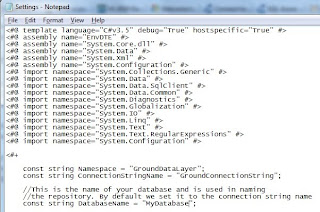
After you've updated the ttinclude it's time to add the template files to your project. Right-click on the GroundDataLayer project and choose Add | Existing Item and navigate to the folder of the template you chose. Select all the items in the folder and add them to the project.
If you get prompted about the T4 templates plotting terroristic actions to your computer go ahead and allow them. On that, of course, always be aware of T4 templates you download in the future to use. I digress...
This will now auto-magically generate the necessary code for you to access your database.
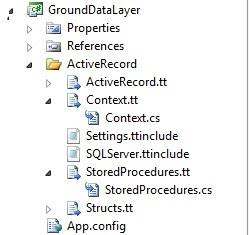
What's even cooler: say we add another stored procedure to our database. Right-clicking on the StoredProcedures.tt in the project and choosing Run Custom Tool will auto-magically regenerate the class to include your changes! NEAT! Sorry, I get excited when I can work smarter.
Hack Some Code
Open the web.config for your MVC2 role project. Copy the connection string from your GroundDataLayer App.config and place it in the auto-magically provided ConnectionStrings config section.
Now, let's go get some data. You're at liberty to do things the right or way or hack the Home view of the project as I did. I have no shame remaining so I'll share what I did:
- Utilized the ViewData["Message"] to inject the data from our sample database into.
- Directly instantiate the Subsonic stored procedures and execute a reader in the Home controller.
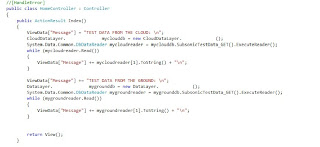
Way to use the MVC pattern, right? I'm just trying to prove this stuff works, not be pretty.
Once you've got this coded, go ahead compile and fix any errors, if any, and run the beast. If everything is coming up aces you should see your sample data in the application.
Head in the CloudRemember the SQL we wrote before for the ground? We're now going to put this to use in SQL Azure.
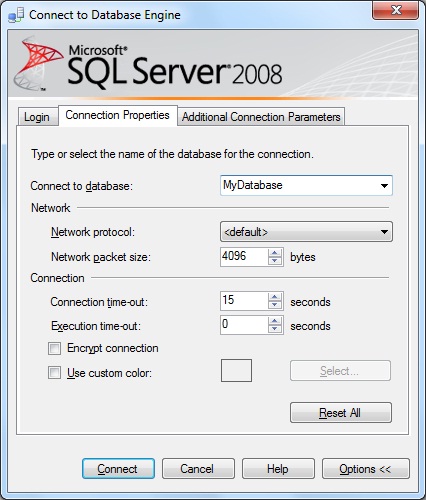
To connect to your SQL Azure instance thru Management Studio open a new query and in the window right-click, choose Connection | Change Connection. This will display the connection manager dialog. Put in your server instance, credentials, go to options and type in the database you wish to use. NOTE: Ensure that you've previously added your IP address to the firewall for SQL Azure. Also, you do not need to specify
userid@server when connecting to SQL Azure thru Change Connection. You will need to do this in your App.config and web.config files.
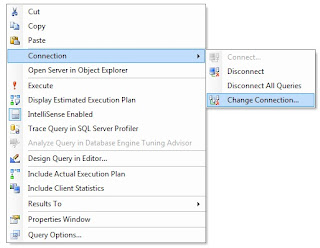
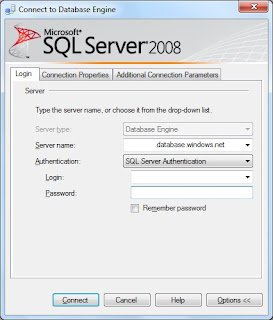
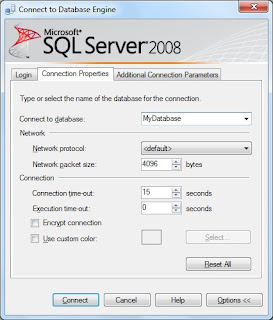
Hopefully you're still coming up aces and you're now connected to your database in the cloud. If so, go ahead and run the SQL from before. If not, fix any issues and try again.
Dancing in the CloudRepeat the same steps above for creating another C# class library project, but naming it CloudDataLayer and in the App.config specify that the connection string points to your cloud.
Modify the T4 template's namespace you chose to avoid ambiguous reference issues with the GroundDataLayer project and add the files to the CloudDataLayer project. Again, allow the templates to run and generate the code. Also, do not worry about the change to the namespace as it will not conflict with the ones in the GroundDataLayer project.
Duplicate your code to display the data from your GroundDataLayer project being sure to reference the CloudDataLayer. Lastly, before compiling and running modify the web.config to point to your cloud database instance.
Running the application you should now see your data being pulled from your cloud database instance using the objects generated from your ground and cloud instances.
Are we done yet? I think not...While this proves that yes: Subsonic 3.0.0.4 works nifty in VS 2010 and you can run your application locally and pull data from the cloud using objects created in either location; it doesn't prove that there will be no issues running the application in the cloud - which really matters.
NOTE: In the event of any run time errors you can comment out the [HandleError] directive in the View and turn off friendly remote errors. This is especially beneficial if something goes FAIL in the cloud.
Blast Off!I'm going to assume you're familiar with configuring a Windows Azure service and deploying your application to the cloud, so I won't bore you with the details. If not, here's the nutshell:
- Publish your cloud service project by right-clicking on the project and selecting Publish. This will create two files: 1.) Application package, which contains the application code; and 2.) Configuration file, respectively.
- It will auto-magically open up the Windows Azure portal, and a Windows Explorer dialog to the Publish directory where those two files are.
- In the portal upload the two files and provide a label for this deployment. The label is arbitrary and can be anything.
While Windows Azure is publishing the application and starting the service, this would be a good time to ensure that Windows Azure is allowed to access your SQL Azure instance. Yes, you need to add a firewall exception for Windows Azure, but don't worry I'll throw you a bone and give you the SQL. If Windows Azure isn't added you will see a message like this:

Go ahead and reconnect to your SQL Azure instance following the steps above, but this time specifying the master database instead of the sample you created. Run this query:
select * from sys.firewall_rulesIf any record returned includes the IP range 0.0.0.0 - 0.0.0.0 then Windows Azure has been added. If not run this query:
exec sp_set_firewall_rule N'Allow Windows Azure', '0.0.0.0', '0.0.0.0'Run the select query again and ensure it's included.
By now, you're application should have published and the service is started. If the service is suspended start it up or if it's still propagating go ahead and smoke 'em if you got 'em.
Comin' In HotNavigate to your application instance in the cloud. If you're still aces you should see your data from the SQL Azure database instance using the ground and cloud generated Subsonic objects. If not, and you've turned off remote, friendly errors, use the details to resolve the issues. If you didn't turn them off, now's the time to do it and update your application in the cloud.
Here's where I leave someone to experiment: I didn't test the insert/update stored procedure in my test app. I left it to my own device and assumption that it would work. In the meantime before I test it, I'd love to hear of anyone doing it.
Things That Go FAIL- Forgetting to add a clustered index to your table.
- Not having the Cloud Service tools installed.
- Not running Azure SDK Command Prompt and VS2010 as admin in Win7.
- Not creating your DevelopmentStorage... database.
- Not updating the T4 template Settings.ttinclude file per the README.
- Not allowing the T4 templates to generate your code.
- Not referencing the SubSonic.Core.dll in your data layer projects.
- Attempting to directly connect to SQL Azure thru Connect To | Database Engine.
- SQL Azure firewall rule for your IP.
- SQL Azure firewall for Windows Azure IP.
- Hacking up MVC to prove this.
Mongo Sez- To be safe, explicitly add your clustered index on the primary key of your table(s) in SQL Azure.
- Run everything as admin in Win7.
- Follow the instructions in VS 2010 for installing the Cloud Service tools.
- Use DSINIT to create your DevelopmentStorage... database.
- Create a Lib directory for third-party binaries and add reference from there - it helps everyone in the end.
- Modify the Settings.ttinclude file per the README instructions for the T4 template.
- Be smart when using third-party T4 templates for security purposes.
- Using a new query and changing the connection to connect to your SQL Azure database.
- Firewall rules for your computer's IP and Windows Azure. Here's the how to from MSDN.
- Don't follow my code examples when I'm doing a quick POC.
Three's company too!